sqlh
sqlh is a handcrafted complete replacer for builtin shell fc, history, and Ctrl+R interactive search.
Why use sqlh?
sqlh is a ground-up reimagining of how shell history can, and arguably should function in the modern day. Most popular shells have been around since the 1970s and 1980s, and their history mechanics are based on the typical use case for the time.
sqlh is designed with the knowledge that these days people rarely ever have just a single shell open. Most people will have multiple shells open simultaneously; whether in separate windows, multiple terminal tabs, or a terminal multiplexer such as tmux or screen.
In order to support this, sqlh makes use of a sqlite database file which each terminal writes to as commands are run.
Highlights
- Portable
- Since sqlh is just a shell script, it will run natively inn bash or zsh on any system.
- Fast
- Typically causes less than 5 milliseconds of overhead.
- Powerful
- sqlh leverages the power of sqlite3 for fast queries and data robustness, and can be configured to use fzf for filtering as well.
- Lightweight
- sqlh requires minimal system resources, and does not need a persistent background daemon.
Compared to builtin shell history
- Pros
- Commands are added to the database as you run them, instead of waiting for shell exit and clobbering the history file.
- Old commands aren't dropped from history as new ones are added due to arbitrary size limits.
- All shells configured to use sqlh can search the database via Ctrl+R and read/execute commands that were run in other shells without needing to reload history and lose their live history order.
- There is a distinction between live history and database history ignore lists, as opposed to a single HISTIGNORE which applies to both, allowing you to maintain new commands in live history but not in the database (and vice-versa). Because nobody wants to clutter their history with the fact that they've run ll 15780 times.
- Re-running a given command increments the run count in the database instead of adding a new entry, meaning for large history files the equivalent database is smaller, and more unique commands can be loaded into a new shell.
- A given command's last run time is always saved regardless of whether HISTTIMEFORMAT is specified, giving more meaningful output when running history when HISTTIMEFORMAT is set, but was not for some commands.
- Advanced match expressions are available for various operations, including but not limited to history ignore entries.
- Each shell configured to use sqlh effectively shares history.
- Cons
- Requires sqlite3 to be installed.
- Slightly slower than shell history; most operations still take less than 20 milliseconds on the high end.
- For small shell histories, the sqlite3 database takes more space than a plaintext file.
- Requires more memory than builtin history to store live history information.
Installation
Prerequisites
sqlh requires sqlite3 version 3.24.0 or higher, and shell support for: both normal & associative arrays, coproc, and EPOCHREALTIME.
The installation script requires curl and either git or jq.
Quickstart
To install sqlh, you can copy the command below and paste it into your console.
Once the installer has run, you will need to open your shell's rc file (e.g. .bashrc for bash, .zshrc for zsh, etc.) and add the following:
If you customized the target installation directory via the --install-dir argument to the installation script, make sure to use the correct path to the installation in your rc file.
Alternate
If you don't want to run the install script, you can also simply clone the repository:
Advanced
If you want to customize your installation, you can pass additional arguments to the installer by adding -s -- after bash and then the arguments you want to specify, e.g.:
Some arguments you may want to customize are as follows.
- -i, --install-dir
- Default Value: ~/.tools/sqlh/
- The folder to install sqlh in.
- -t, --target
- Default Value: master
- The target branch, tag, or commit to install.
- -C, --prefer-curl
- Default Value: false
- Use curl instead of git for installation.
- -R, --skip-readme
- Default Value: false on fresh installation, otherwise true
- Do not display the README when done installing.
- -S, --sqlite-path
- Default Value: $(command -v sqlite3)
- Specify an alternate location for sqlite3.
Setting Up sqlh
Basic Setup
By default, sqlh will inherit from your existing HISTIGNORE and HISTSIZE variables.
sqlh's defaults can be further customized by changing the following variables before sourcing the script:
- SQLH_HISTIGNORE
- Defaults to the expanded value of HISTIGNORE, or an empty array if unset.
- An array of commands to omit from the history database. These commands will still show up in live history unless also specified in SQLH_LIVE_HISTIGNORE.
- SQLH_LIVE_HISTIGNORE
- Defaults to the expanded value of HISTIGNORE, or an empty array if unset.
- An array of commands to omit from live history. These commands will still show up in the database unless also specified in SQLH_HISTIGNORE.
- SQLH_HISTSIZE
- Defaults to HISTSIZE, or 500 if unset.
- The number of commands to read in to live history when starting a new shell.
Additional variables you can use to tweak behavior are documented in the Advanced Usage section.
sqlh also exports the following variable for public use:
- SQLH_HISTCMD
- sqlh's' equivalent of the builtin HISTCMD, the history number of the current command (i.e. the number of entries currently stored in live history)
Using sqlh
sqlh provides the sqlh function, which has subcommands to access most of the functionality of the script; and sqlite-i-search, which replaces your shell's builtin Ctrl+R search.
sqlh Subcommands
sqlh init
Initializes sqlh. Takes no additional arguments at this time.
sqlh fc
Runs sqlh's replacement of builtin fc. Understands all arguments to builtin fc, as well as the following long-form versions:
- -e, --editor
- Specify an editor to use. If not specified, defaults to FCEDIT or EDITOR.
- -l, --list
- Prints history entries to the console rather than invoking the editor.
- -n, --no-numbers
- Omits history indices from list output.
- -r, --reverse
- Reverses list output.
- -s, --substitute
- Performs substitution on a command.
sqlh fc also understands -h and --help and will print a help message to the console, unlike builtin fc.
sqlh history
Runs sqlh's replacement of builtin history. Understands most arguments to builtin history, as well as the following long-form versions:
- -a, --append
- Append live history to the history file. Ignored by sqlh because it is not necessary.
- -c, --clear
- Clears live history.
- -d, --delete
- Deletes entries from live history.
- -n, --read-new
- Reads new entries from the history file into live history.
- -p, --substitute
- Performs substitution on the given command without adding it to live history, printing the result to the console.
- -r, --reload
- Loads from the history file into live history.
- -w, --write
- Write live history to the history file, overwriting any previous contents. Ignored by sqlh because it is not necessary.
sqlh history also understands -h and --help and will print a help message to the console, unlike builtin history.
The following entirely new options are added in addition to the above:
- -f, --filter
- Takes an advanced match expression and filters output to only those entries matching the expression. May be used in conjunction with -o.
- -F, --prune-from
- Takes a comma-separated list of prune targets consisting of live or db, followed by a series of advanced match expressions. Prunes entries matching the given expression(s) from live or database history, as specified.
- -o, --omit
- Takes an advanced match expression and filters output to only those entries not matching the expression. May be used in conjunction with -f.
- -P, --pager
- Outputs history to the system pager instead of printing to the console.
- -R, --prune
- Takes a series of advanced match expressions. Prunes entries matching the given expression(s) from both live and database history.
sqlh update and sqlh update-check
Runs the installer script with pre-filled arguments for your current installation.
sqlh version
Reports the version of sqlh to the console.
sqlite-i-search (Ctrl+R search)
sqlite-i-search is a drop-in replacement for shell builtin Ctrl+R search (reverse-i-search in bash, reverse-history-search in zsh), but instead of only being able to search the local shell's live history, it also searches in the database, pulling in any new commands run in other shells.
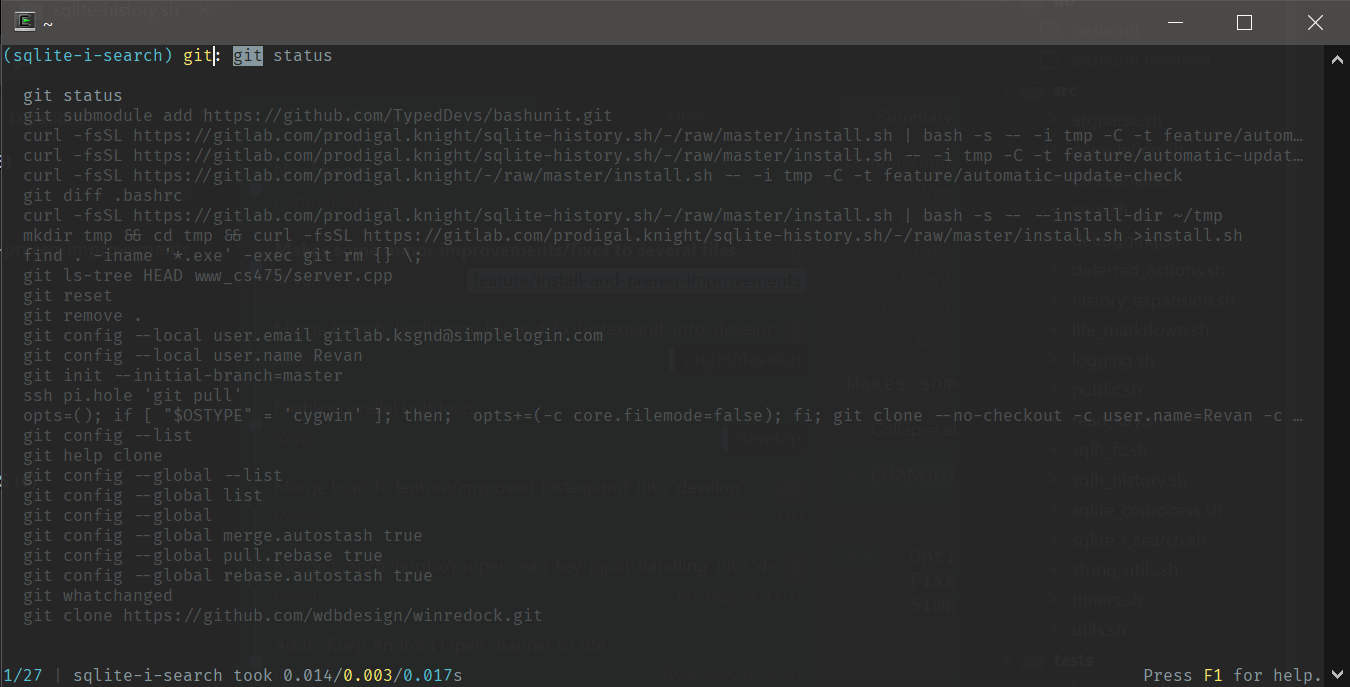
Usage is nearly identical to that of bash's reverse-i-search, with the following key bindings:
- Escape
- Exit sqlite-i-search and set the current command buffer to whatever the current selection was. The cursor will be placed at the first instance of matched text in the selection.
- Up/Down Arrow Keys
- Attempts to find the index of the currently selected command in live history and navigates through live history from that point, selecting the previous/next result. Exits sqlite-i-search.
- Left/Right Arrow Keys
- Selects the current command and exits sqlite-i-search, then moves the cursor either to the left or the right of the beginning of the first instance of matched text in the command; e.g.: if searching for "hello" and the command is echo "hello world", the left arrow key would move the cursor to the first double quote, and the right arrow key would move the cursor to the 'e' in "Hello".
- Ctrl+R
- Selects the next oldest (previous) matched entry, unless there are no more matches.
- Ctrl+N
- Selects the next newest matched entry, unless you are at the first (most recent) match.
- This key binding is different from reverse-i-search's binding of Ctrl+S because that keystroke is normally swallowed by the terminal.
- Home
- Selects the current command and exits sqlite-i-search, then moves the cursor to the beginning of the line.
- End
- Selects the current command and exits sqlite-i-search, then moves the cursor to the end of the line.
- Enter/Return
- Selects the current command and exits sqlite-i-search, then moves the cursor to the end of the line.
- This currently does not attempt to automatically run the selected command like reverse-i-search would for consistency across shells and operating systems, because we have been unable to find a truly cross-platform of sending an extra keystroke to the parent terminal.
- Tab
- Selects the current command and exits sqlite-i-search, then moves the cursor to the first instance of matched text in the command.
All other "special" keystrokes are ignored at this time.
By default, sqlite-i-search is configured to be run in place of the standard Ctrl+R search, but the keybind to start it can be customized.
You can also configure sqlh to use fzf if installed by setting one of the following to a truthy value (i.e. anything other than false):
- SQLH_USE_FZF
- Configures sqlh to use fzf for filtering/sorting results in sqlite-i-search instead of querying the database.
- SQLH_USE_FZF_PICKER
- Delegates to the fzf picker.
Advanced Usage
Advanced Match Expressions
sqlh fc, sqlh history, and sqlh's live/database history ignore arrays all allow usage of advanced match expressions, on top of standard shell history ignore patterns. Advanced match expressions consist of a standard shell history ignore pattern preceded by one of the following special characters:
- = for exact matching of an entire command
- =l[ls] will match either ll or ls, but not ls -l.
- ^ for the start of a command
- ^ls will match any of the following: ls, ls -l, ls ~, etc.
- $ for the end of a command
- $| less will match any command piped to less.
- / for substring matching anywhere in a command
- /kill will match commands containing kill, pkill, skill, etc.
- ! for exact word matching anywhere in a command
- !kill will only match commands containing the exact word kill, and not commands containing other words that include "kill" like pkill, skill, etc.
Not having a special character, or escaping one of the above special characters with a backslash (\) will cause the match expression to use default behavior as defined by the value of SQLH_IMPLICIT_STARTSWITH as detailed below.
Environment Variables
Core Behavior
- NO_COLOR
- No Default Value
- Disables ANSI color codes in output, following the no-color.org standard.
- SQLH_SQLITE
- Default Value: $(command -v sqlite3)
- The path to the sqlite3 executable you wish to use. Will also be eventually used to allow using sqlcipher.
- SQLH_HISTFILE
- Default Value: ~/history.sqlite
- The path sqlh's history file.
- SQLH_NO_CLOBBER_BUILTINS
- No Default Value
- Prevent clobbering (shadowing) shell builtins fc and history with shell functions, only providing sqlh fc and sqlh history.
- SQLH_IMPLICIT_STARTSWITH
- No Default Value
- Use startswith matching to determine if a given shell command should be ignored, instead of mimicing default shell behavior of matching the full command.
- SQLH_BETA_OPT_IN
- No Default Value
- Opt in to beta features available on the develop branch of the repository instead of waiting for them to reach an official release.
- SQLH_UPDATE_CHECK_INTERVAL
- Default Value: "1d"
- A duration string describing how often to check for updates. Supports discrete units from seconds to weeks.
- SQLH_UPDATE_MSG_QUEUE
- Default Value: "precmd"
- The name of the deferred action queue to use for printing "updates are available" messages. Valid values are currently precmd and preprompt.
- SQLH_USE_FZF
- No Default Value
- Configures sqlite-i-search to filter history using fzf instead of querying the database for exact matches. Mutually exclusive with SQLH_USE_FZF_PICKER.
- SQLH_USE_FZF_PICKER
- No Default Value
- Configures sqlite-i-search to delegate to the fzf picker, bypassing normal sqlite-i-search. Mutually exclusive with SQLH_USE_FZF.
- SQLH_FZF
- Default Value: $(command -v fzf)
- Custom path to fzf executable, overriding inferred path from command -v fzf.
sqlite-i-search Behavior
- SQLH_ELLIPSIS
- Default Value: $'\u2026' (…)
- The ellipsis to show at the end of the line if a command preview is longer than the allowable display width.
- SQLH_PREVIEW_HORIZONTAL_PADDING
- Default Value: 2
- The number of columns on either side of a command preview line.
- SQLH_PREVIEW_VERTICAL_PADDING
- Default Value: 2
- The number of blank lines to maintain between the top (prompt + result), middle (command previews), and bottom (status line) parts of sqlite-i-search.
Miscellaneous Behavior
The following variables are intended primarily for debugging, and have no default values.
- SQLH_ALLOW_DEBUG_LOGS
- If set to any value other than false, enables debug logging. Otherwise, debug logging is a no-op to keep sqlh as fast as possible.
- SQLH_DEBUG_LEVEL
- An integer value between 0 and 3 (inclusive) which controls the level of debug logging verbosity. Has no effect if SQLH_ALLOW_DEBUG_LOGS is set to false.
- SQLH_LOG_FILE
- The path of a log file to write to.
- SQLH_SUPPRESS_LOGS_IN_TERM
- Suppresses log messages in the terminal, printing them only to the log file if explicitly set to anything other than false.
Custom Keybinds
You can customize several key bindings for sqlh via the following additional environment variables:
- SQLH_REVERSE_I_SEARCH_KEYBIND
- Ctrl+R
- Initiates sqlite-i-search.
- SQLH_PREV_HIST_ENTRY_KEYBIND
- Up Arrow
- Navigates to previous history entry when not in sqlite-i-search.
- SQLH_NEXT_HIST_ENTRY_KEYBIND
- Down Arrow
- Navigates to next history entry when not in sqlite-i-search.
Custom Colors
If you have not opted to disable colorization entirely by enabling NO_COLOR above, you can customize the colors sqlh uses in various situations by changing these environment variables:
- SQLH_INTERACTIVE_SUCCESS_COLOR
- Used in sqlite-i-search for successful search indication; default value: \e[36m (ANSI Cyan)
- SQLH_INTERACTIVE_FAILURE_COLOR
- Used in sqlite-i-search for failed search indication; default value: \e[31m (ANSI Red)
- SQLH_INTERACTIVE_TERM_COLOR
- Used in sqlite-i-search for search term; default value: \e[93m (ANSI Bright Yellow)
- SQLH_INTERACTIVE_RESULT_COLOR
- Used in sqlite-i-search for search result; default value: \e[94m (ANSI Bright Blue)
- SQLH_LOGGING_HIGHLIGHT_COLOR
- Used in logging to highlight [sqlh]; default value: \e[36m (ANSI Cyan)
- SQLH_LOGGING_ERROR_COLOR
- Used in error logs; default value: \e[31m (ANSI Red)
- SQLH_LOGGING_WARN_COLOR
- Used in warning logs; default value: \e[33m (ANSI Yellow)
- SQLH_LOGGING_INFO_COLOR
- Used in info logs; default value: \e[93m (ANSI Bright Yellow)
- SQLH_LOGGING_DEBUG_COLOR
- Used in debug logs; default value: \e[37m (ANSI White)
- SQLH_LOGGING_TRACE_COLOR
- Used in stack trace logs; default value: \e[33m (ANSI Yellow)
- SQLH_HYPERLINK_COLOR
- Used in Markdown conversion; no default value
- SQLH_ASIDE_COLOR
- Used in Markdown conversion; default value: \e[90m (ANSI Bright Black)
“Perfection is achieved, not when there is nothing more to add,
but when there is nothing left to take away.”
— Antoine de Saint-Exupéry, Airman's Odyssey
Handcrafted Code
sqlh and its maintainers are proud of the fact that 100% of the repository has been written without AI.
Our Promise
We will do everything in our power to keep sqlh AI-free forever - that is to say, we will do everything we reasonably can to ensure no code is merged that was created using AI contributions or assistance, and we will never introduce any sort of AI assistant to sqlh itself.
Why?
If you haven't guessed already, the quote at the top of this page was chosen for a reason; we believe that software should remain simple and do only the bare minimum work necessary to accomplish its goals. AI in its current form (that is, LLMs and Generative AI in general) is designed to create as much content as possible. When used in the development environment, GenAI creates so much code that it becomes impossible to review it all in a reasonable amount of time.
This, as well as the relative ease of churning out new features with GenAI, leads developers into a mindset of "more is more" where it really should be "less is more". In keeping GenAI out of the mix, we are forced to think about what the potential benefits and drawbacks of adding a particular feature are before adding it, instead of going straight to a prompt and asking the LLM to spit out what, in the end, essentially amounts to a prototype in terms of completeness: 90% of the functionality is there, but the last 90% of the work to get to 100% is still left.
In addition, AI companies are currently gobbling up all of the computing hardware in the world, crowding out the individual consumer, preventing normal people from being able to afford a computer. Whether this is by design or not isn't important - we believe that everyone should be able to do what they want on their computer without everything being funneled through the cloud or some AI agent.
We also believe that the shell in particular should be a place that never be able to mislead the user. AI "assistants" will always hallucinate fake or incorrect information, regardless of how well they're trained on real data.
This is not to say that we believe AI is useless. We just believe that jamming AI into anything and everything possible is the peak of stupidity, and we would like to leave users with at least one tool that isn't trying to be smarter than it should be.
Keeping AI out of development also helps us better tune the performance of sqlh, for several reasons.
- There is already ample evidence that using AI tools causes a decline in a user's ability to complete tasks by themselves.
- AI is trained on "good" coding patterns, which for shell scripts almost always means using subshells. This kills the performance of sqlh in critical areas such as sqlite-i-search search, which needs to be able to redraw the screen in as near to realtime as possible as the user types.
Benefits
- You don't need to upgrade your device in order to run sqlh.
- It typically requires less than 1 megabyte of additional RAM per shell.
- It doesn't matter if you have a GPU/NPU/TPU, none are needed. Just a plain old CPU.
-
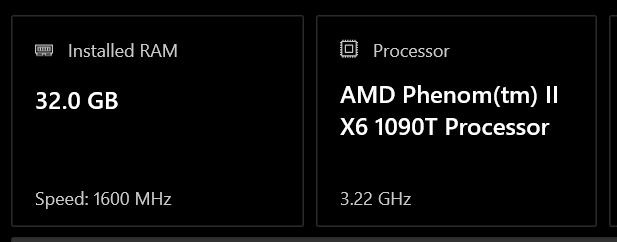
It reliably initializes in around 175 milliseconds... on a 15+ year old PC running in Cygwin on Windows 10, even when debug logs are enabled.For comparison, that's equivalent to roughly 19 subshell invocations on a modern computer running actual Linux at 9ms/subshell for relatively trivial operations, and sqlh is doing a lot more than that during initialization.

Don't believe me? Run time echo hello which is essentially instantaneous, and then time echo "$(echo hello)" - the difference is staggering.
- sqlite-i-search initializes in under 5 milliseconds, and has a typical overhead of less than 5 milliseconds per keystroke.
Drawbacks
- It can take longer to develop individual features because we actually have to think through things ourselves and type everything by hand instead of allowing the AI to generate most of the code.
Call it bias, but we really can't think of any other drawbacks.
sqlh Compared to Other Projects
| sqlh | atuin | |
|---|---|---|
| Daemonless | ✔ |
✘ |
| No Third-Party Dependencies | ✔ |
✘ |
| Integrates with fzf | ✔ |
⚠ Custom implementation of fzf algorithm |
| Preserves Full History | ⚠ Only distinct commands |
✔ |
| Additional Command Metadata | ✔ |
✔ |
| Separate Live/File History Ignore Lists | ✔ |
✘ |
| Synchronize Across Multiple Computers | ✘ |
⚠ Only via Atuin servers |
| Optional Database Encryption | ✘ |
⚠ Only for database sync |
| Cross-Shell | ⚠ |
✔ bash, fish, Nushell, PowerShell, xonsh, zsh |